Overview
Often times we need different versions of the same tool in different projects on our local development environment, however its installer doesn’t allow multiple versions easily.
Version managers like nvm ( ), rvm ( ), pyenv ( ), sdkman ( ) among others solved this.
While these have been very useful, suddenly your shell gets cluttered, and often times some of these can slow down the startup time of your shell if not configured correctly.
Installing mise
Mise installation is as easy as using your preferred package manager or the infamous curl to shell command
Expand this section to see a few, or see their installation docs
Using your distribution preferred package manager run to install
sudo snap install mise --classic --betasudo dnf copr enable jdxcode/mise
sudo dnf install misesudo apt update -y && sudo apt install -y curl
sudo install -dm 755 /etc/apt/keyrings
curl -fSs https://mise.jdx.dev/gpg-key.pub | sudo tee /etc/apt/keyrings/mise-archive-keyring.pub 1> /dev/null
echo "deb [signed-by=/etc/apt/keyrings/mise-archive-keyring.pub arch=amd64] https://mise.jdx.dev/deb stable main" | sudo tee /etc/apt/sources.list.d/mise.list
sudo apt update
sudo apt install -y miseInstall mise by using brew package manager
brew install miseOpen a Windows PowerShell Admin session and depending on your preferred windows tool run
choco install -y misewinget install jdx.misescoop install miseAs with many CLI packages, the latest package is available in its repository releases.
|
It is convenient to have mise activated on your shell
Depending on your environment and installation method, you might need to activate mise on your shell profile/config. For example, run to activate mise in |
What is available to install?
Run mise registry to show all available tools or mise use to pick a tool from an interactive terminal.
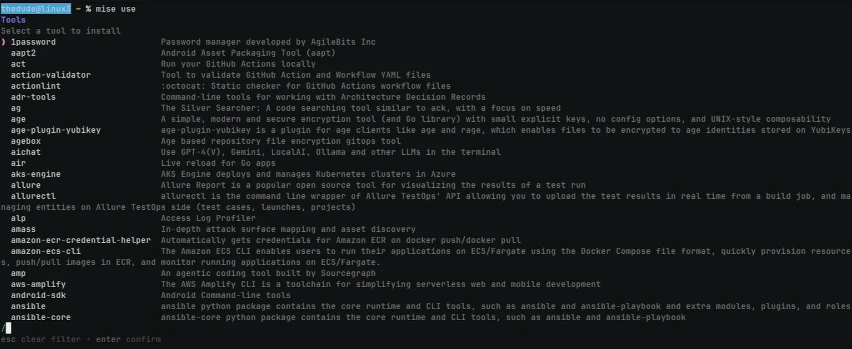
Also, the whole list is documented here
Where do the tools come from ?
Mise have this concept of Backends which determines where the artifact is going to be pulled from.
At the moment of writing this post, mise supports the following Core tools:
-
Bun
-
Deno
-
Elixir
-
Erlang
-
Go
-
Java
-
Node.js
-
Python
-
Ruby
-
Rust
-
Zig
In most of these mise can do it’s magic, and easily install them, for some like Ruby have to meet some OS dependencies, each of them has its own documentation.
Some of the backends and tool examples:
-
httpUseful for binary distributed on a https url-
mise use http:claude
-
mise use http:flutter
-
-
gitlabUseful for downloading from a gitlab repo releases-
mise use gitlab:gitlab-org/cli
-
mise use gitlab:gitlab-org/gitlab-runner
-
-
githubFrom a GitHub repo releases-
mise use github:JetBrains/kotlin
-
mise use github:mobile-dev-inc/maestro
-
Configuration
Mise configuration uses a TOML file, it can be global or localized to a project directory.
When a tool is installed using the mise use -g command, modifies the global config file, if not then the folder where the mise command was executed.
To list the configuration files you can run mise cfg

If a project mise.toml is commited and pushed to its git repository, then on a fresh system can clone the repository, at the moment of entering the project directory mise will warn that the file is not trusted.
Run mise trust mise.toml and then can install everything by running mise install
One of the biggest advantages of mise, is that it can pick up the versions from other version managers (for example .nvmrc or sdkmanrc), but to do this, we need to enable it with a mise settings command
mise settings add idiomatic_version_file_enable_tools node
mise settings add idiomatic_version_file_enable_tools java
These previous 2 commands will modify the global config file to support node and java version manager files. Read their documentation on supported version manager files
Other features
Mise can also set environment variables, define and run tasks or define shell aliases.
I foresee disabling ohmyzsh aliases and cherry-pick the aliases from the plugins I have installed and add them as mise aliases, to unclutter my aliases.
IDE integrations
There are several third party integrations for different IDE’s
-
Vim
-
Emacs
-
XCode